Unlock the Power of URL Scraper Tools for Smarter Data with Public Scraper
In the modern digital world, data is everything. Businesses rely on it to make decisions, marketers use it to understand trends, researchers depend on it for accurate analysis, and developers need it to fuel projects. But there’s one major problem: collecting data manually is slow and inefficient.
Imagine visiting hundreds of websites, copying titles, descriptions, and content, then pasting everything into a spreadsheet. Not only would this take days, but it would also be exhausting and error-prone. That’s where tools like an URL Scraper or Data Scraper come in.
These tools are designed to save time, eliminate mistakes, and deliver structured information instantly. And when it comes to choosing the right tool, Public Scraper has quickly become one of the most popular and trusted solutions.
What Is an URL Scraper?
An URL Scraper is a powerful tool that allows you to automatically extract information from multiple web addresses. Instead of checking each page one by one, you simply provide a list of URLs, and the scraper collects the data for you.
The most common information collected includes:
- Page Titles – the main headline inside the
<title>tag. - Meta Descriptions – short summaries that describe the page.
- Main Content – the core article, product description, or blog post.
- Contact Huner – scrape phones and emails from website
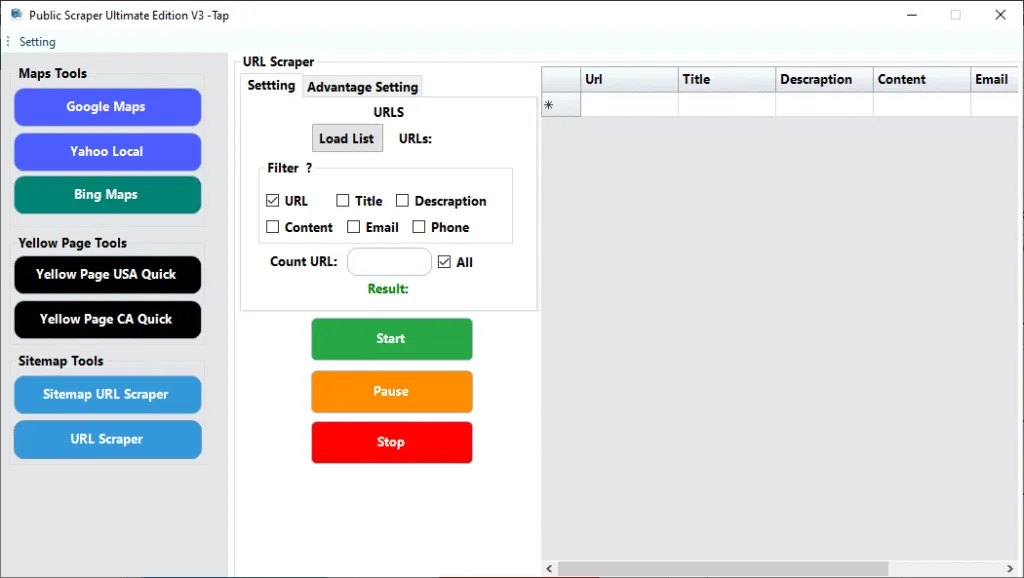
This process can save hours of manual work and provides clean, structured data that’s ready to analyze.
What Is a Data Scraper?
While an URL Scraper works specifically with lists of web addresses, a Data Scraper is a broader term. It’s a tool designed to pull out information from websites in general—whether that’s product details, pricing, reviews, or full articles.
Think of it this way:
- URL Scraper → You already know the list of links you want to extract from.
- Data Scraper → You want to pull out information, even if you don’t have a list of URLs prepared.
Both tools are essential in modern business and research, and many platforms (like Public Scraper) combine these features to give you maximum flexibility.
Why Do You Need an URL Scraper or Data Scraper?
The internet is full of valuable information—but only if you know how to collect it efficiently. Here’s how professionals use scrapers every day:
SEO Experts
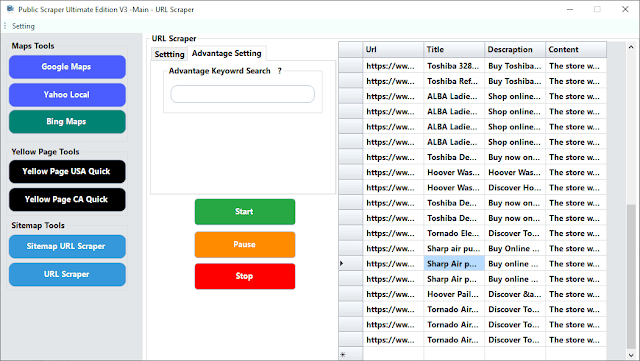
SEO specialists use URL Scrapers to collect titles and meta descriptions from competitors. This helps them analyze keyword strategies, optimize their own content, and improve rankings in Google search results.
Content Creators
Bloggers, journalists, and creators use scrapers to gather headlines, intros, or trending topics. Instead of spending hours researching, they get all the data in one place and can focus on producing high-quality content.
Businesses and Marketers
E-commerce businesses rely on Data Scrapers to monitor competitor pricing, product descriptions, and stock updates. With real-time data, they can adjust their own strategies and stay competitive.
Researchers and Academics
Scrapers make it possible to collect structured datasets from multiple websites in minutes. Researchers can then analyze patterns and build insights without wasting time on manual collection.
Key Benefits of Using an URL Scraper
Still wondering if it’s worth it? Here are some undeniable advantages:
- Speed – process hundreds or thousands of URLs in seconds.
- Accuracy – minimize human error by automating extraction.
- Scalability – easily handle massive datasets.
- Efficiency – focus on analyzing insights instead of collecting them.
- Accessibility – no technical or coding skills required with modern tools.
Public Scraper: The Best URL Scraper and Data Scraper
Not all scrapers are created equal. Some are too complicated, others are slow, and many don’t deliver clean results. That’s why more and more professionals are turning to Public Scraper.
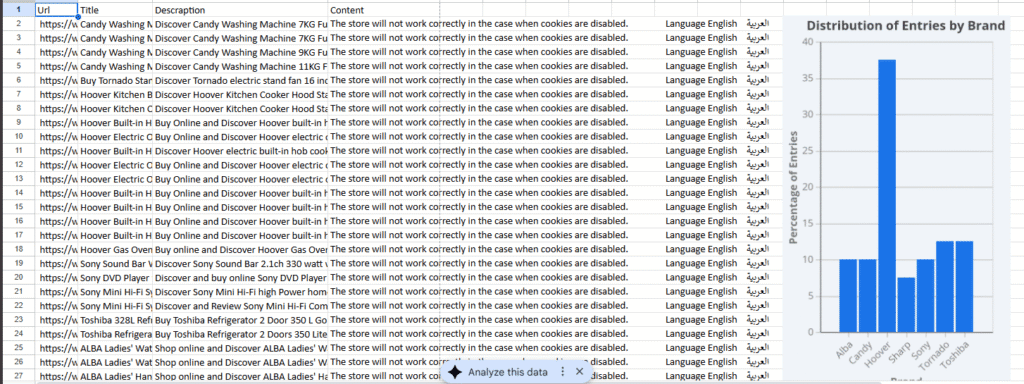
Public Scraper makes the entire process simple, fast, and effective. Here’s what you can do with it:
- Upload or paste a list of URLs and scrape instantly.
- Extract titles, descriptions, and full content without errors.
- Use built-in filters to refine your results.
- Export data to Excel, CSV, or JSON for easy analysis.
- Scrape without coding—perfect for beginners.
It combines the best of both worlds: the functionality of an URL Scraper and the versatility of a Data Scraper.
How to Use Public Scraper Step by Step
Getting started is incredibly simple:
- Prepare your URL list – save the links you want to scrape in a file.
- Open Public Scraper and select the URL Scraper tool.
- Upload your file or paste the links directly.
- Choose the data you need – titles, meta descriptions, or full content.
- Click start and let the scraper work.
- Export your results into Excel, CSV, or JSON.
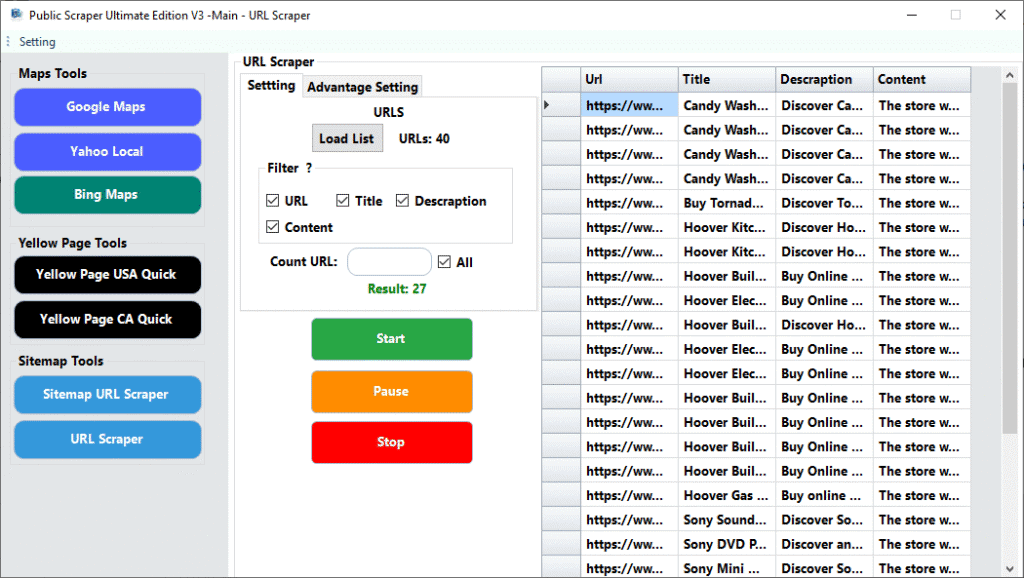
That’s it—no coding, no stress, just results.
Why Public Scraper Stands Out
Plenty of scrapers exist, but Public Scraper has a few unique advantages:
- Faster scraping speeds for big projects.
- Cleaner, more accurate data with fewer errors.
- User-friendly design anyone can learn quickly.
- Multiple scraping modes, including sitemap scraping.
- Regular updates to keep up with user needs.
It’s built for SEO experts, marketers, researchers, and businesses that need results quickly and reliably.
Best Practices for URL and Data Scraping
To make the most of your scraping efforts, follow these tips:
- Be ethical – scrape only publicly available information.
- Keep data relevant – don’t collect what you don’t need.
- Stay organized – maintain neat URL lists and spreadsheets.
- Use filters wisely – refine your results for better accuracy.
- Turn data into insights – collecting is only half the job; use the information strategically.
Public Scraper: 7 Powerful Tools in One Subscription or Lifetime Access
What makes Public Scraper stand out is that it’s not just a single URL Scraper. With one affordable subscription or even a lifetime plan, you actually get access to 7 tools in one platform. That means you don’t need to juggle different services or pay for multiple products. Everything you need for data scraping is already built in.
Here’s what’s included inside Public Scraper:
- Google Maps Scraper – collect business details, reviews, and contact info from Google Maps.
- Yahoo Local Scraper – extract local business listings and information from Yahoo Local.
- Bing Maps Scraper – gather company profiles, addresses, and ratings from Bing Maps.
- Yellow Pages USA Scraper – pull leads and business data directly from Yellow Pages in the U.S.
- Yellow Pages Canada Scraper – capture business information and listings from Canadian Yellow Pages.
- Sitemaps XML Scraper – automatically crawl and extract URLs from sitemap files.
- URL Scraper – grab titles, meta descriptions, and page content from any list of links you provide.
Instead of paying separately for tools that only do one job, Public Scraper gives you the full package. Whether you’re working on SEO, lead generation, market research, or content analysis, you’ll have everything you need in one easy-to-use platform.
Final Thoughts
In today’s fast-paced digital world, the ability to gather information quickly can give you a serious edge. Manual research is no longer practical, and that’s why tools like an URL Scraper or Data Scraper are now essential for anyone working with web data.
Whether you’re optimizing SEO, creating content, conducting research, or analyzing markets, scraping tools make it faster and easier to get results.
And when it comes to choosing the right solution, Public Scraper offers the perfect balance of power and simplicity. It’s fast, accurate, and requires no coding—making it the go-to choice for professionals across industries.
Start using an URL Scraper or Data Scraper today with Public Scraper and discover how easy it is to transform a list of links into actionable insights.