You have experienced the agony of a partially resolved lead, hand copy-pasting, and lost business behind filters, had you depended upon the Better Business Bureau as the source of qualified leads. This is solved by the BBB Scraper having the new BBB Advanced Scraping feature. It extracts meaningful data at scale, processes it selectively, and exports a list of clean data that you can put to use. This guide provides a step-by-step manner to its usage, making it easy to use, thus providing greater coverage with less effort.
The Importance of BBB Advanced Scraping
The traditional scraping will terminate at the end of the results that can be seen in a single page. BBB Advanced Scraping continues:
- Navigates complete sets of the results on a city, state, and category basis.
- Lists all general BBB, and accredited-only lists.
- Outreach and enrichment are the major areas of business.
- Manages unsupervised multi-keywords.
The result is simple: you will find more businesses, more valid contacts in your network and you will have less gaps in your data.
What You Can Extract
The scraper is capable of collecting:
- Name of the business, type, phone, Internet, address.
- Accreditation and BBB rating.
- Letter on the internet in the form of public emails and emails that can be found on associated websites.
- Information such as service area, hours and description of the profile.
Precise fields are dependent on the profile, although the tool is set to map BBB pages into a homogenous set of data which can be applied to campaigns.
Rapid Fire: Pull Out All That You Require
These are the steps followed within BBB Scraper. Stick to the tight and consistent keywords.
Choose Your Source List
Select either:

- BBB Business List on all the applicable results.
- BBB Accredited Business List to the accredited target only.
Write Your Keywords
Type in one or several keywords that will suit your targets.
- Want multiple keywords? Separate with commas.
- No spaces. Use dashes instead.
- Sample: automobile-repair, plumbing-service, roofing-contractor.
Start Extraction
Press Extract. The tool will take results and profiles of BBB in turn, gathering fields along the way.
Pause or Stop Anytime
You are able to stop the run to look into the incomplete data or to change your inputs.
Export Your Results
Export to a text file to look at in a few seconds, or export it to your CRM or spreadsheet process.
That’s the basic flow. In the case of large territories or mixed categories, the built-in filter can be used to narrow the targeting down before the deeper pass is run.
Intense Targeting with BBB Filter
BBB Filter should be used in case of a wide range of list and must be reduced by region or scope prior to extraction.

- Open BBB Filter
- Load your list that comes out of the first search.
- Choose the country
- Write the state code where necessary in order to target quicker and cleaner.
- Press Filter
- Save the filtered file
- Insert it into BBB and press Start to get it out.
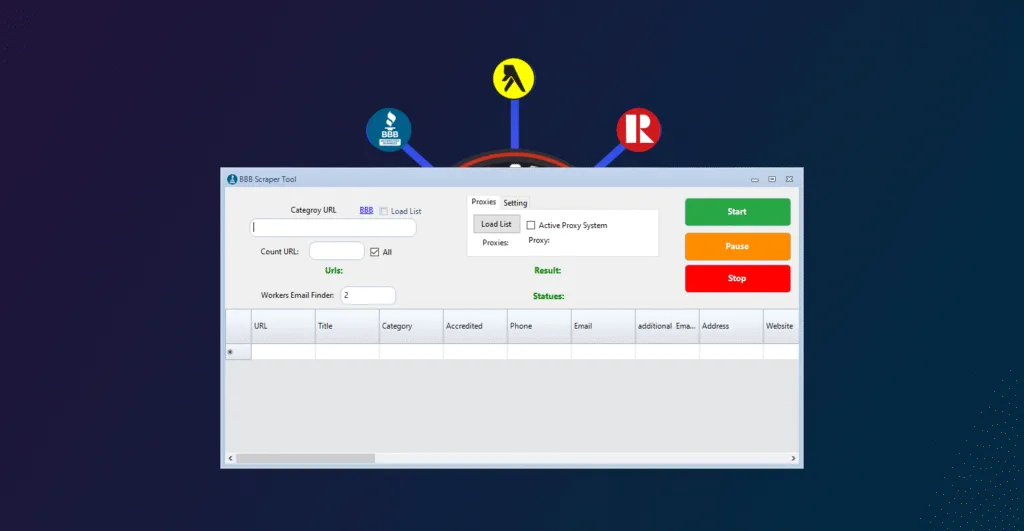
In case you do not filter, press Move to Extract and the tool will automatically begin the extraction. Filtering only minimizes noise and computing time of very large pulls.
Strategies to be Able to Go Outside the Box and Evade Blindspots
These basic operating principles will help you to cover more and get better data.
- Apply layered keywords: Combine a service keyword and a qualifier.
- Examples: hvac-repair, commercial-plumbing, residential-roofing, emergency-garage-door.
- Write systematically: Invest in states where you have a competitive niche. It enhances to the page traversal and reduces missed clusters.
- Listed being accredited first, followed by full list: BBB Accredited Business List will be a good start listing that will get us trusted profiles. Complete with BBB Business List to fill blank spots.
- Check email websites: The scraper verifies linked sites where there is one. This will more likely increase the possibility of finding working addresses.
- Export and combine: Export individual runs, and combine and deduplicate in your CRM or spreadsheet.
- Avoid naming: It is always a good practice to use words in dash form. Reproductibility is enhanced due to consistency and enables you to re-run in the future.
Data Sanitation and Export Workflow
An uncontaminated pipeline is time saving downstream.
- Quick checks are made through export to text and the data is imported to Excel or Google Sheets.
- Filter by domain + phone to contain volume
- Identifying tag: bbbaccred, bbball.
- Add state and city columns when making multi-region campaigns.
- Accreditation, rating and the availability of email are examples of simple scoring criteria.
Advanced vs. Basic Runs
When should advanced or basic runs be used?
- When doing multi-state search, high volume category or where you need to be sure of maximum coverage, use Advanced.
- Basic should be used when you are testing keywords, validating a niche, or pulling a small city.
Beyond BBB with Public Scraper Ultimate
When you only need one stack to prospect, enrich and build campaigns, then use Public Scraper Ultimate Edition. It integrates more than 14 scrapers and automation assistance into a single interface, targeting with AI assistance, and has a data center footprint to give extensive coverage.
Scrape bulk data using Public Scraper Ultimate Edition. It brings together professionally level scrapers in a single bundle to marketers, search engine optimization team and growth operators. Multi-source campaigning, automating niche discovery and producing production-ready datasets. With the support of AI processes and extensive global footprint, it allows you to save money, minimize tool proliferation, and deliver your findings faster.
Included tools:
- URL Scraper & Contact Hunter
- Sitemap XML Scraper
- Yellow Pages Canada Scraper
- Yellow Pages USA Scraper
- Bing Maps Scraper
- Yahoo Local Scraper
- Google Maps Scraper
- AI Niche Targeting
- Manta Scraper
- SuperPages Scraper
- Realtor.ca Scraper
- Telegram Automation
- SMS Bulk Sender
- BBB Scraper
Combine BBB Advanced Scraping with map scrapers and directory scrapers to confirm coverage, cross-match contacts details, and give preference to leads that are mentioned by several platforms.
Summary
Aim: to cover all the applicable businesses in BBB with a minimal number of gaps.
Procedure: pick the appropriate list, provide clean dash-style keywords, use Advanced extraction, and (where necessary) filter by country and state.
Output: export organized information that you can act upon with accreditation and profile information that makes prioritization swift.
Scale: Synergy with other sources: Public Scraper Ultimate to be used to extend to other sources to increase the scope of verification.
Leave a Reply