Introduction: Why Sitemaps Matter in SEO
XML sitemaps are the backbone of website indexing. They provide search engines with a structured list of URLs, helping Google, Bing, and other crawlers understand your site architecture. But beyond search engine bots, sitemaps are a goldmine for SEO professionals and digital marketers. They contain every essential page URL — from blogs and products to news articles and media files.
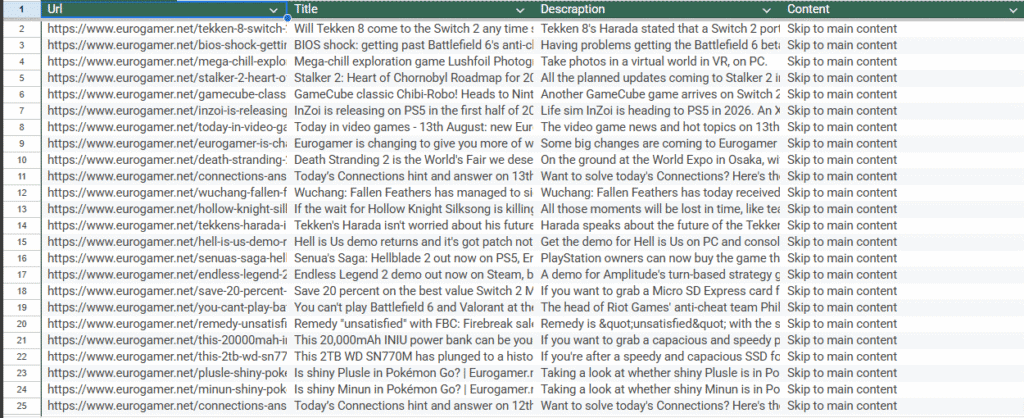
The challenge? Manually extracting and organizing sitemap data is time-consuming. That’s where the Sitemap XML Scraper comes in. This tool turns complex XML files into usable, structured datasets that you can analyze, filter, and export in seconds.
In this guide, we’ll cover:
- What the Sitemap XML Scraper is and why it’s powerful.
- Step-by-step instructions on how to use it.
- Advanced filtering and keyword techniques for SEO.
- Export options and best practices.
- Pro tips to maximize your data collection.
- How it compares with a related tool: the URL Scraper.
What is the Sitemap XML Scraper?
The Sitemap XML Scraper is a no-code web data extraction tool built for speed, accuracy, and simplicity. Instead of spending hours parsing XML files manually, you can:
- Instantly discover all sitemaps on any website (root, index, nested).
- Extract URLs, titles, meta descriptions, and main content.
- Apply keyword filters to create focused datasets.
- Export data in multiple formats for SEO campaigns.
Whether you’re an SEO professional auditing competitors, a content strategist researching topics, or a digital marketer planning outreach, this scraper transforms raw XML into actionable insights.
Step 1: Discover All Sitemaps
Every website can have multiple sitemap files. These include:
- sitemap.xml (the root file).
- index-sitemap.xml (an index of multiple sitemaps).
- Nested sitemaps (e.g., for news, blogs, images, or products).
How to extract them:
- Open the Sitemap XML Scraper inside Public Scraper.
- Paste the main website URL into the input field.
- Click Get Sitemap to automatically scan and detect all sitemap files.
- Right-click the sitemap list to save all discovered links into a text file for auditing.
- Left-click any sitemap to open it in the built-in URL extractor view.
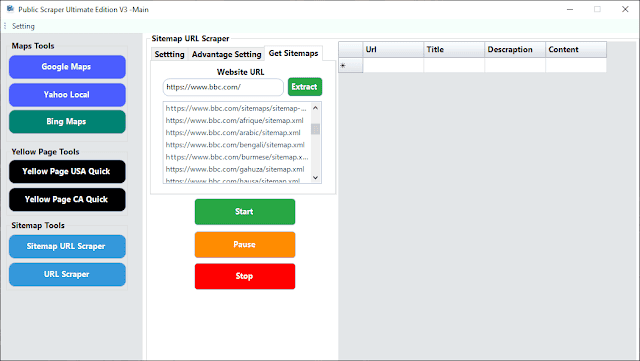
SEO tip: Always check nested sitemaps (especially for large ecommerce or media sites) — they often contain highly valuable long-tail content.
Step 2: Extract URLs, Titles, and Content
Once you have the sitemap list, you can begin scraping.
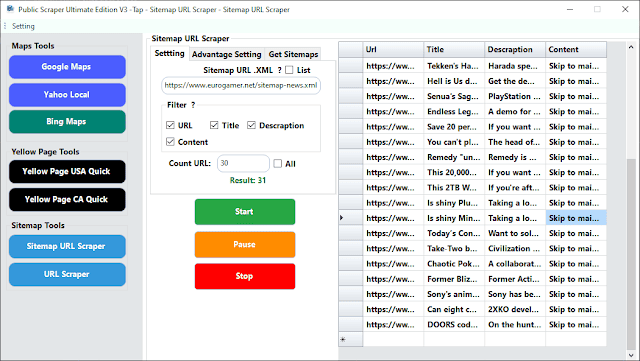
- Select a sitemap from the list (or use List Mode to paste multiple).
- Choose how many URLs to process (all or a limited sample).
- Click Start Extraction to fetch:
- Page titles (for SEO audits).
- Meta descriptions (for CTR optimization).
- Body content (articles, product descriptions, or landing page copy).
SEO use case: Exporting titles + descriptions is ideal for analyzing competitor metadata strategies.
Step 3: Keyword Filtering & Advanced Searches
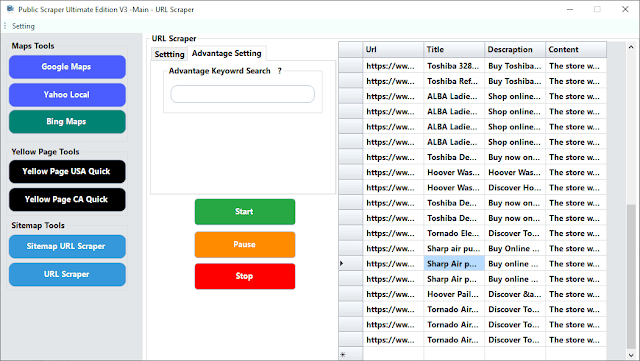
The Sitemap XML Scraper comes with built-in keyword search and filtering options.
- Enter a target keyword in the search box.
- Only matching URLs, titles, and descriptions will appear.
- Combine filters with URL limits to build niche datasets.
Examples:
- Filter for “/blog/” + “AI” → Creates a dataset of AI-related blog posts.
- Filter for “/product/” + “shoes” → Extracts all shoe products from an ecommerce sitemap.
SEO tip: Use keyword filtering to reverse engineer a competitor’s content strategy.
Step 4: Export Data in Multiple Formats
After extraction, simply:
- Right-click anywhere in the results table.
- Select Save.
- Choose your format:
- .xlsx for editorial planning.
- .csv for bulk operations (like redirects or audits).
- .json for developer workflows.
SEO tip: Store datasets in .xlsx when presenting to clients – it’s easier to review and edit.
Power Tips for Better SEO Results
- Start with root sitemap.xml → Drill down into nested files for categories like images, news, or products.
- Run small tests first → Validate data structure and scraper performance.
- Apply filters early → Prevent bloated datasets and keep results relevant.
- Repeat runs → Experiment with different filters and combine exports into a master dataset.
Why SEO Professionals Love the Sitemap XML Scraper
- Instant discovery of all sitemaps (root + nested).
- Scalable extractions of thousands of URLs.
- Built-in filtering for targeted SEO datasets.
- No coding required — beginner-friendly UI.
- Multiple export formats for any workflow.
This tool is a must-have for:
- Competitor research.
- Content gap analysis.
- Technical SEO audits.
- Editorial planning.
Related Tool: The URL Scraper
If you already have a list of URLs and only want to extract titles, descriptions, and content, the URL Scraper is the perfect companion. Instead of working from sitemaps, it processes bulk URLs directly.
👉 Try it here: URL Scraper Tool
Frequently Asked Questions (FAQ)
1. Does left-clicking open a different tool?
No, left-clicking a sitemap opens it directly inside the same tool’s extractor view.
2. Can I filter by keyword before exporting?
Yes. Apply keyword filters during extraction to save only relevant data.
3. What export formats are supported?
You can export results as .xlsx, .csv, or .json.
4. Can I process multiple sitemap files at once?
Yes. Use List Mode to paste multiple sitemap URLs (each ending with .xml).
7 Tools in 1 – One Subscription or Lifetime Access
Imagine having seven powerful SEO tools rolled into one simple platform. That’s exactly what you get with the Sitemap XML Scraper. Instead of juggling multiple apps and paying for different subscriptions, you get everything you need — sitemap discovery, URL extraction, keyword filtering, content scraping, competitor research, bulk exports, and reporting — all in one place. And the best part? You can choose a monthly subscription if you prefer flexibility, or grab a lifetime deal and enjoy unlimited access forever. One tool, one price, endless SEO possibilities.
Special Offer Coming in October – Limited to 10 Clients
This October, we’re rewarding our early supporters with an exclusive deal. The first 10 clients to sign up will unlock:
- Double the Value → Subscribe for 1 month and get an extra month FREE.
- 10% Off Lifetime Access → Secure a lifetime license at a special launch discount, only for the first 10 clients.
Final Thoughts
The Sitemap XML Scraper is more than just a scraping tool — it’s a complete SEO workflow. From sitemap discovery to dataset creation, keyword filtering, and export, it saves hours of manual work.
By turning raw XML sitemaps into structured insights, you can:
- Uncover competitor strategies.
- Find content opportunities.
- Build keyword-focused datasets.
- Automate technical audits.
Whether you’re working on link-building campaigns, content planning, or competitive analysis, the Sitemap XML Scraper gives you speed, accuracy, and flexibility every time.
Get started today and transform how you work with XML sitemaps.