What Is a Yahoo Business Listing? (Simple Guide for SEO)
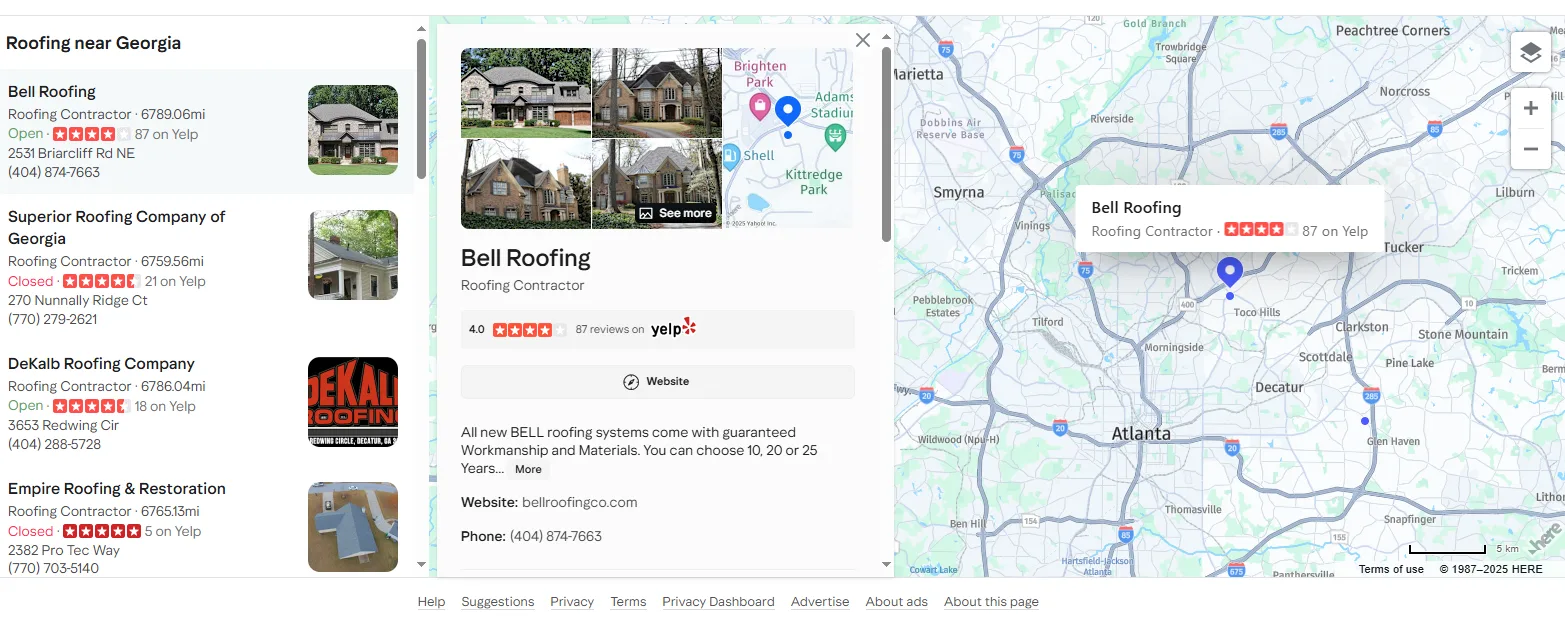
A Yahoo Business Listing is a web-based profile of your business that is displayed on the local search experience of Yahoo (including Yahoo Local results). It has your business name, address, phone (NAP), website, categories, hours, photos, and reviews. People can compare different options and call you easily when they search such words as “dentist near me” or “plumber in Austin.”
Why does it matter? Local search is intent-driven because it is directed. The one making the search is most of the time willing to call, book, and visit. A fully comprehensive Yahoo listing will result in you being found at the point of need.
The Importance of Yahoo Listing to SEO and Marketing
- Visibility: Yahoo continues to serve millions of searches, data syndicates, and is integrated into other experiences. Appearing here expands your footprint not just at Google.
- Credibility and Conversions: The same NAP information on the web (including Yahoo) will minimize confusion and will make your customers comfortable to call or visit you.
- Local Ranking Signals: Search engines are based on consistency, relevance, and proximity. A Yahoo profile is clean and helps in all three.
- Review and Reputation Cues: Ratings and new reviews are important to clicks. When the listing of a competitor appears more comprehensive or has more up-to-date reviews, they will get the call.
- Attribution & Testing: With the help of tracking of clicks and calls generated by your Yahoo listing, you will be able to demonstrate what truly moves revenue in your local channels.
What Data Is Present in a Yahoo Business Listing?
Most or all of the following may be found, depending on the business and the available:
- Name of the business, address, phone (NAP)
- Booking and Website links
- Categories and brief description
- Operating hours and extra hours
- Photos and logo
- Ratings and review snippets
- Location (lat/long) and directions
The stricter and the more uniform this information is between Yahoo and other directories, the stronger your local SEO base.
Yahoo Business Listing: How to Optimize (Checklist)
- Claim and authenticate your business in order to have control of the data.
- Enter your real-world Name, Address, Phone just as you are publishing on your site and other directories.
- Choose correct, narrow preferences (do not overstuff).
- Use one or two target keywords in natural use in a simple and benefit-oriented description.
- Fit images (outside, inside, employees, products).
- Have hours updated, such as holiday hours.
- Keep a check on reviews—brief, courteous, and useful responses are the most effective.
- Record performances (site clicks, calls, directions) in order to have the growth to measure.
Where Data Efforts Become Problematic (and Teams Waste Time)
When you have to check in dozens or hundreds of places (cities), manual checks will not be scalable. Audits, QA, competitive research, and lead generation require clean, location-true data by the marketing and SEO teams. That is the reason why we designed tools to do the heavy lifting.
Yahoo Local Scraper: Scraper for Yelp and Google
Business data is structured on our Yahoo Local scraper as the local results of Yahoo themselves so that you can analyze markets and correct listings at scale—without copy-pasting.
What It Is (When It Is Seen)
- Business name, types, address, phone
- Website and map links
- Ratings/review counts
- Hours (if present)
- Latitude and longitude (where present)
Essentials That Make Your Pipeline Clean
- Location-true searches: The queries are executed with every target city to indicate the actual local SERP.
- Intelligent proxy rotation: Load your proxy list and configure the automation to alternate proxies after a specified number of cities (or errors/time). This minimizes blocks and maintains throughput at a constant level.
- Rate limits, backoff, retries: Prevents anti-bot triggered spikes.
- De-duplication: Eliminates identical records on a single keyword/whereabouts.
- Filters: Select the websites, minimum rating, or categories.
- Exports: Live one-click CSV, XLSX, or JSON to easily import into a sheet, BI tool, or CRM.
- Scheduling: Re-run the identical projects after a week or month to monitor the change.
Easy Configuration: Yahoo Local Scraper Instructions
- Insert your keywords (e.g., “dentist,” “emergency plumber,” “Italian restaurant”).
- Add locations (cities, zip codes/regions you would like to target).
- Copy your proxy list and select how the automation is going to restart and switch the proxy after X cities (you decide how many cities).
- Begin scraping/monitor live progress records.
- Export/review your results CSV/XLSX/JSON.
- (Optional) Pre-outreach deduplicate and merge with existing CRM records.
Use responsibly. Never violate the terms of sites or local laws during the collection or use of data.
Cases of How Marketers and SEO Teams Utilize This Data
- NAP audits: Spot discrepant names/phones across cities and contact them.
- Competitive research: Find out the rank of every market, rankings, and categories.
- Lead generation: Sell specific outreach lists of businesses that lack websites, low rating, or poor description.
- Location expansion: Before you go to a new location, verify the demand and the concentration of competitors.
- Reporting: Measure the number of listings that got better each month (increased reviews, improved ratings, increased visibility).
Public Scraper Ultimate: Single Workspace to All Your Data Ops
Public Scraper Ultimate is a complete scraping and automation platform. It is a blend of our Yahoo Local Scraper and all the rest of the scrapers we have created into one convenient dashboard. It implies that marketers, SEO teams, and sales operations will not have to juggle several tools and scripts in order to operate all their data pipelines.
Leave a Reply