Yahoo Local Scraper & Map Scraper: The Ultimate Tools for Extracting Business Leads and Location Data
Introduction
The digital economy moves fast—faster than most teams can copy-paste. That’s why tools like a Yahoo Local Scraper and a Map Scraper have become essential. They turn raw business and location data into actionable insights that keep your marketing sharp, your sales pipeline breathing, and your local outreach precisely on target. Whether you’re a marketer trying to optimize campaigns, a researcher tracking competitors, or a business owner wearing three hats at once, having reliable business and location data from sources like Yahoo Local and Maps determines how quickly you spot opportunities—and how often those turn into loyal customers.
That’s exactly where tools like Yahoo Local Scraper and a Map Scraper step in. They automate the boring parts: collecting business listings, contact details, addresses, websites, and more. Instead of opening a hundred tabs, you get clean, structured rows you can act on. It’s accurate, it scales, and it’s much less painful than manual research.
Manual methods eat hours—it’s nobody’s favorite job. Scrapers flip the script by pulling large, structured datasets in minutes. You can use that data for lead generation, competitive research, CRM enrichment, and all sorts of location-based campaigns. In this article, we’ll walk through what the Yahoo Local Scraper does, the exact data it can capture, how to use it step by step, and why pairing it with a Map Scraper (like a Bing Maps Scraper) is a smart move if you’re serious about growth.
What Is Yahoo Local Scraper?
The Yahoo Local Scraper is a simple, focused software tool that extracts business and location information from Yahoo Local. Yahoo Local has been around for years—it’s one of those directories that just keeps showing up, and many businesses still rely on it to keep their details visible across search engines. By scraping the platform, you unlock a lot of structured information without slogging through page after page by hand.
This is especially useful for digital marketing teams, B2B outreach, franchise development, and local SEO work—any workflow where detailed business info matters. Instead of scattered notes and half-complete spreadsheets, you get a dataset that’s actually ready for action.
Data You Can Extract with Yahoo Local Scraper
One big reason people use Yahoo Local Scraper: it captures more than just the basics. You need more than a name and a phone number to do real outreach. You need context—enough to segment, prioritize, and personalize.
Here’s the typical set of fields you can pull:
- Business Name – The exact brand or local store name (helps avoid duplicates).
- Category – Pinpoint industries or services for sharper targeting.
- Phone Number – Call prospects directly or verify listings quickly.
- Address – Map physical locations for local campaigns or route planning.
- Website URL – Check their online presence; use it for email outreach or analysis.
- Ratings and Reviews – A snapshot of customer sentiment before you reach out.
- Social Media Links – Often includes Facebook, Twitter (X), LinkedIn, and YouTube for multi-channel engagement.
- Business Description – A short “what they do” so you can qualify at a glance.
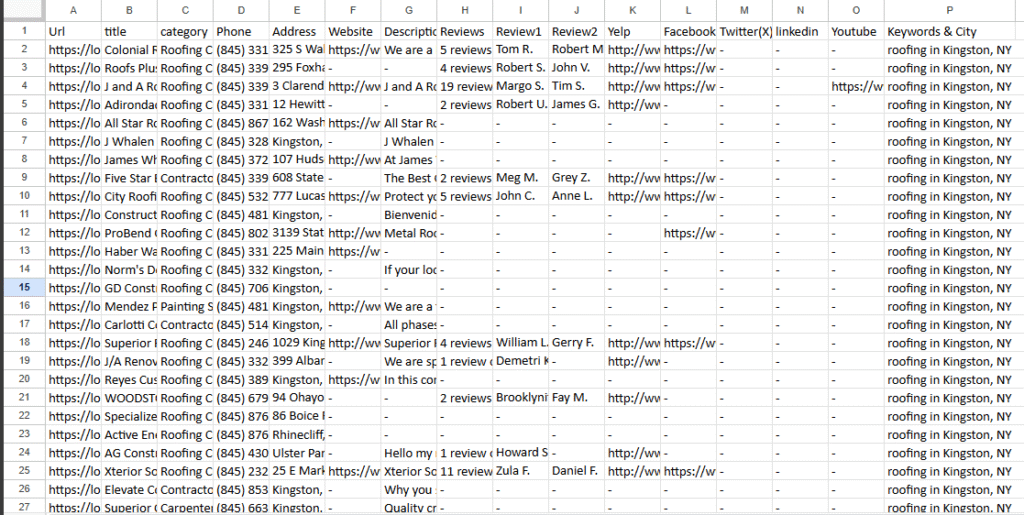
This complete view turns a list into something living—sortable, filterable, and actually useful for a CRM or sales motion.
Step-by-Step: How to Use Yahoo Local Scraper
Good news: you don’t need to be technical to get value here. The interface is beginner-friendly but still flexible enough for power users.
- Load Keywords – Start with relevant terms: “plumbers,” “law firms,” “digital agencies,” “roofing,” “dentists,” and so on. Go broad at first; you can refine later.
- Load Cities or Regions – Add the locations you want to target. Could be one metro area, multiple cities, or nationwide. Scale is up to you.
- Enable Proxies (Optional) – For large-scale scraping, rotating proxy support helps keep sessions stable and reduces interruptions. Handy when you’re going big.
- Start Scraping – One click, and the scraper begins capturing real-time business information.
- Export Data – When it’s done, export to CSV, Excel (XLSX), or JSON for your next step—importing, cleaning, segmenting, whatever your workflow requires.
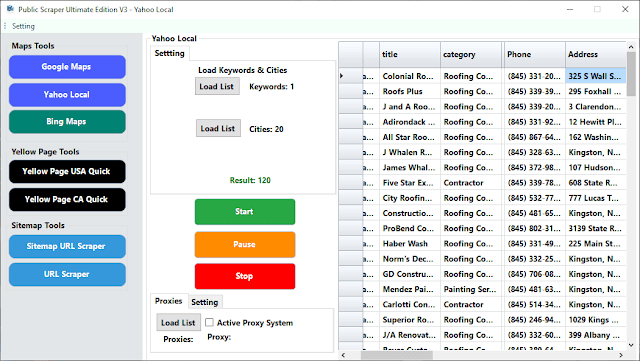
This automation cuts down on human error and delivers clean, structured data quickly. You spend less time collecting and more time acting.
Affordable Subscription – Just $15/Month
The Yahoo Local Scraper isn’t just one tool — it’s actually 7 powerful tools in one, giving you everything you need for lead generation, business data extraction, and local SEO campaigns. For only $15 per month, you get unlimited access to all features with no hidden fees. Even better, until the end of October, there’s a limited-time promotion: buy 1 month and get 1 extra month free. This means you can supercharge your marketing and SEO campaigns at half the usual cost, making it the smartest investment for any business looking to scale.
Key Features of Yahoo Local Scraper
- Lightning-Fast Collection – Hundreds or thousands of entries in minutes, not days.
- Proxy Support – Use a proxy setup to scrape at scale with fewer hiccups.
- Unlimited Sessions – Run searches as often as you need; keep building the dataset.
- Multiple Export Formats – Save your data to CSV, Excel, or JSON—pick what your team uses.
- Beginner-Friendly – No coding required. Clicks, not scripts.
Why Businesses Choose Yahoo Local Scraper
Teams use Yahoo Local Scraper because it saves time and delivers consistent results. When the list is accurate, outreach performs better—more replies, fewer wasted calls, cleaner CRM records. With this tool, you can:
- Build high-quality lead lists for cold calling.
- Run local SEO campaigns using detailed location data.
- Analyze competitors by looking at ratings and real reviews.
- Find “hidden” opportunities in neighborhoods or niches you might skip otherwise.
Short version: this isn’t just about collecting data; it’s about creating a repeatable path to insight—and then to revenue.
Map Scraper: Going Beyond Yahoo Local
Yahoo Local is strong. But it’s one directory. Pairing it with a Map Scraper (like a Bing Maps Scraper) makes your coverage much wider. Many businesses appear on map platforms first because customers search “near me” more than they type full brand names. If you only pull from one source, you’ll miss things.
A Map Scraper works in a similar way: it extracts business info—phone numbers, addresses, websites, and customer reviews. When you use both Yahoo Local Scraper and a Map Scraper together, you can:
- Cross-verify for accuracy – If phone, name, and address match across both, you can trust the record more. If they don’t, you flag it.
- Capture listings across multiple platforms – Some show up in maps, some in directories; using both makes your net bigger.
- Expand directory coverage – Different ecosystems bring different listings.
- Build richer datasets – Extra details (like hours or more reviews) can sharpen targeting.
This two-tool approach shrinks blind spots. You stop missing local businesses that matter.
Exporting Data for Business Growth
Exporting is where rows become action. Both Yahoo Local Scraper and Map Scraper let you export to popular formats, which means the data can flow straight into tools your team already uses:
- CRMs – Salesforce, HubSpot, Pipedrive, Zoho—map fields once and import on repeat.
- Analytics Dashboards – Track performance and pipeline contributions in Looker Studio, Power BI, etc.
By smoothing out the export step, scrapers turn raw information into usable, trackable, repeatable insight. Less friction, more momentum.
Benefits of Using Yahoo Local Scraper and Map Scraper
- Save Time – Automate data collection that would otherwise take weeks (or just never happen).
- Scale Easily – Go from one city to nation-wide without changing the process.
- Improve Accuracy – Structured, machine-extracted data reduces manual typos.
- Generate More Leads – Build lists tailored to categories, services, and precise locations.
- Enhance Local Marketing – Aim messages at the right area, at the right moment, with better context.
And yes—your team will like you more when you stop asking them to copy phone numbers all afternoon.
A Practical Flow You Can Repeat
Here’s a simple cadence many teams follow:
- Run Yahoo Local Scraper with broad keywords across chosen cities.
- Run the Map Scraper on the same keywords and locations.
- Merge the datasets (phone is often the cleanest unique key), then check name + address when needed.
- Tag each record with a “Source” field (“Yahoo,” “Bing,” “Google”).
- Export a clean list to your CRM, segment by city/category/rating, and launch your campaign.
Next week? Do it again for a new region or a new niche. Same steps, same wins.
A Few Light Touches on Quality
Scrapers are fast, but a short quality pass pays off:
- Deduplicate by phone; then check name + address for safety.
- Sanity-check obvious outliers (broken URLs, odd characters, wrong phone lengths).
- Validate websites when you can; sites that load cleanly often correlate with active businesses.
- Segment categories more tightly if your list is mixed (e.g., “contractors” → roofers, painters, GC). Your outreach will land better.
This isn’t busywork. It’s the difference between list noise and list value.
Notes on Proxies and Responsible Use
You can run small jobs without a proxy just fine. For larger jobs, rotating proxies help keep sessions stable and reduce interruptions. That said, always follow each website’s terms and your local laws. Be respectful with requests; don’t overload endpoints. Sustainable processes beat clever shortcuts every time.
Final Thoughts
In a crowded market, accurate and comprehensive data can be the edge that separates you from everyone else. Yahoo Local Scraper and a Map Scraper work together to give you that edge—automated collection, better coverage, cleaner structure, and exports that slip right into your existing tools.
By automating lead generation, improving accuracy, and scaling the boring parts, these scrapers save time, reduce costs, and boost outcomes. Whether you’re a small startup targeting a handful of neighborhoods or an established enterprise rolling out in multiple states, this combo helps you find opportunities, act on them, and measure what sticks.
If your aim is to dominate local markets, use both: Yahoo Local Scraper for dependable directory data, and a Map Scraper to widen the net. Cross-verify, export, segment, and go. You’ll end up with the most complete, accurate, and actionable datasets on your desk—and more importantly, in your pipeline.